
Update from April 9, 2025
Here is a description of features included in the April 9 update.
New functionality for Operators
- Draft message saving has been added when switching to another conversation. The draft retains the text of the typed message and information about the message being replied to. More details on working in the chat window can be found in the section Консультирование клиентов → Диалоговое окно.
- A table with detailed information about the time spent in a specific status has been added for each displayed operator in the section Активность операторов.
New functionality for Verifiers and Project Managers
- The display of statistics in the Общая статистика
section has been changed: the blocks with indicators have been moved to the
left of the diagram for handled and missed dialogues, so that they are
visible when the window with filters for the section is open.
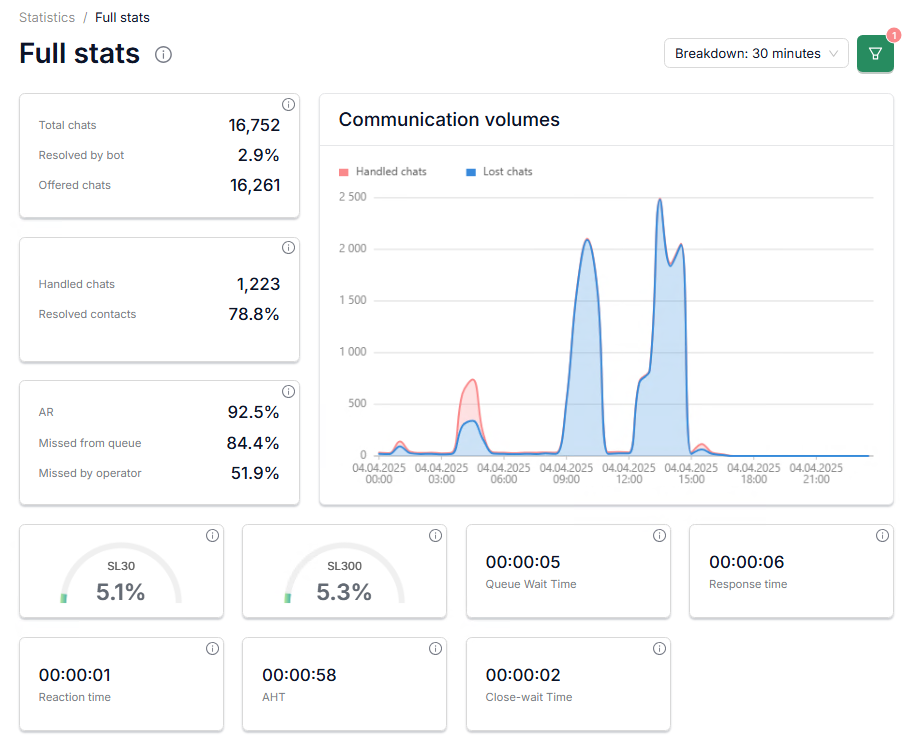
- A table with detailed information about the time spent in a specific status has been added for each operator in the section Активность операторов.
- You can now save the selected filter values for future use, so you
don’t have to set them up again. Just click the Add new button, and
all selected filters will be saved for easy use in the future.
The more information about filters can be found in the Справочная информация section.
- The ability to sort the section Общая статистика indicators by query type (VIP / non-VIP) has been added.
New functionality for Language Managers
- The display of statistics in the section has been
changed: the blocks with indicators have been moved to the left of the
diagram for handled and missed dialogues, so that they are visible when the
window with filters for the section is open.
- Indicators for open disputes on verifiers' ratings and the number of changed ratings after these disputes have been added to the section → . The column name Operators inspected in the table has been changed to Number of Ratings. A general header Employee Statuses has been added to the table header for columns with employee time-related metrics.
- A table with detailed information about the time spent in a specific status has been added for each displayed operator in the section .
- You can now save the selected filter values for future use, so you don’t have to set them up again. Just click the Add new button, and all selected filters will be saved for easy use in the future. The more information about filters can be found in the Справочная информация section.
- The ability to sort the section indicators by query type (VIP / non-VIP) has been added.
- The logic for selecting an operator has been changed when there is no
operator with the required language available on shift: if the client hasn't
chosen an alternative language from the suggested list, the SupHelper system
will continue searching for an operator in the language the client initially
selected. If no operator is found and no one responds in the chat, the
conversation will be closed due to inactivity.
The more information about the chat queue can be found in the Механизм очереди обращений section.
New functionality for Administrators
- A filter by group has been added for exporting Report on verifiers' work and Inspection report. You can now export data for a selected group. More details on creating reports can be found in the Создание отчета section.
- Filters by project, language, tag and group have been added for exporting Report on verifiers. More details on creating reports can be found in the Создание отчета section.
- Filters by project, language, country of registration, status and role of an employee have been added for exporting Employee report. More details on creating reports can be found in the Создание отчета section.